Account and login
How to restore a purchase or access an existing subscription
When to use this
- You already paid but the app still shows a free trial or watermark
- You reinstalled the app and lost access
- You switched computers or devices
- You logged in with a different email by mistake
How to restore
On the trial-expired screen, click I already have premium. Elsewhere in the app, use the Restore purchase link in the side panel — both open the same flow:
- Enter the email address your subscription is under (not necessarily the one you're currently logged in with).
- We email a 6-digit code to that subscription email — check the inbox for that address, not the one you typed if it's different from where you're currently logged in.
- Enter the code to verify.
- Close and reopen the app.
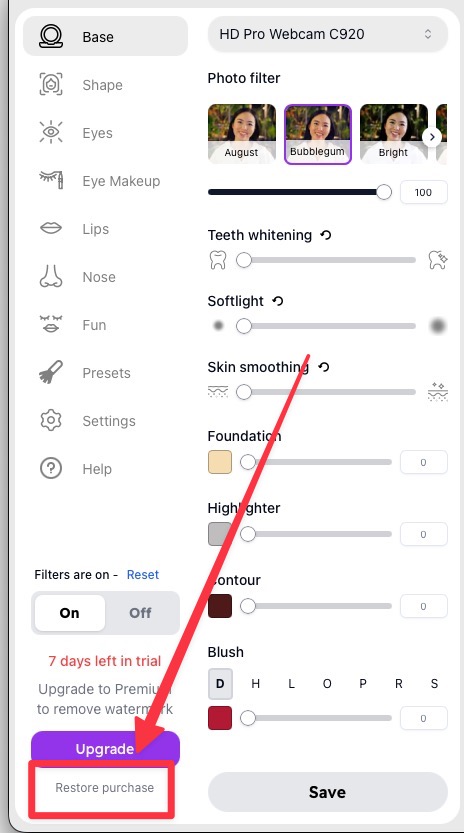
This only works if the subscription is still active on that email, and only if the account you're currently logged into doesn't already have its own active subscription.
If that doesn't fix it
- Log in with the email you paid with. People often pay with one email (say, a work address on the receipt) and open the app logged into another. Sign out first from the Settings tab.
- Reset the app, then restart your computer. Mac: the Reset button, bottom-left. Windows: File > Reset, top-left. This clears a stale local copy of your subscription status.
- Reinstall the latest version. Older app versions are sometimes fully deprecated. Download the current version at filteronme.com/downloads.
Still not working after all of that? Contact support — include the email you paid with and we'll check your account directly.
Related
Did this answer your question?