Using with your apps
Virtual background
Filteronme doesn't have a built-in virtual background feature.
You can still get one — just apply it in whichever app or OS is downstream of Filteronme. Zoom, Google Meet, and Microsoft Teams all have their own virtual background option, and OBS supports it too. Many webcam apps and macOS itself have this built in as well.
Seeing a background you didn't set (Mac)
If a virtual background shows up in Filteronme that you didn't turn on there, it's likely macOS's built-in camera background feature, not Filteronme's.
- With Filteronme open and your camera active, click the camera icon in the Mac menu bar.
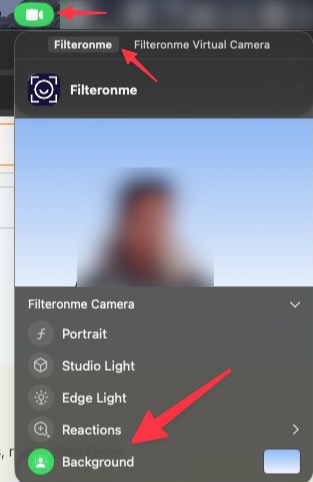
- Find Background in the list and deselect it.
That should clear it.
Did this answer your question?