Using with your apps
How to use Filteronme with WhatsApp
WhatsApp support is desktop-app only — the WhatsApp mobile app can't use Filteronme.
Open Filteronme first, then select Filteronme Camera during a video call in the WhatsApp desktop app.
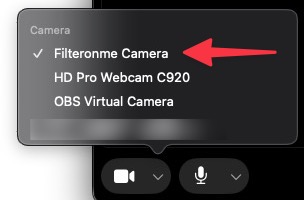
Getting a "Camera In Use" error on Windows? Open Filteronme first and confirm your camera shows up in its preview, then open WhatsApp.
Still not working? Try the fallback chain: your camera → Filteronme → OBS → WhatsApp. Add Filteronme as a source in OBS, then select the "OBS Virtual Camera" inside WhatsApp.
Did this answer your question?