Using with your apps
How to rotate or flip the camera on Mac
Is your camera upside down or sideways? You can turn it in Filteronme on Mac.
- Open Filteronme.
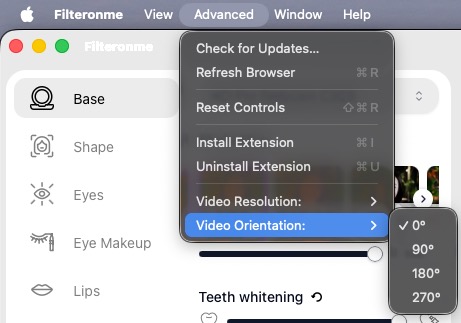
- In the menu bar at the top of the screen, click Advanced.
- Go to Video Orientation and choose an angle:
- 0°: normal (the default)
- 90° or 270°: turns the picture sideways. If one turns it the wrong way, pick the other.
- 180°: turns the picture upside down
The change shows right away in Filteronme and in your video app, and Filteronme keeps it the next time you open the app.
Flip vertically
180° turns the picture upside down, which fixes a camera that's mounted upside down. If you need a true vertical flip (a mirror image top to bottom), choose 180° and then turn on Mirror in the Settings tab. See How to mirror the video.
Flip left to right
That's mirroring, not rotation. Go to the Settings tab and toggle Mirror.
Did this answer your question?